Nassau 1.10
Lightweight and free utility for Windows that allows you to quickly view detailed information about a computer's network connections.
Description
Nassau is a lightweight and free utility for Windows that allows you to quickly view detailed information about a computer's network connections. It was designed to be simple, efficient, and use few system resources, making it a practical tool for network administrators, technicians, or anyone who needs to monitor network configurations without complications.
Main Features:
- System Tray Icon: Once started, Nassau appears as a small icon in the taskbar, near the clock. Hovering over the icon displays a tooltip with basic information, such as username, computer name, and workgroup/domain.
- Network Details: For each active network adapter, the program shows:
- IP addresses (IPv4 and IPv6, if applicable);
- Gateway addresses;
- DNS server addresses.
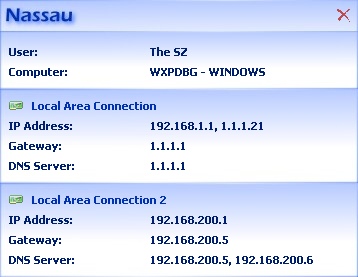
- Optional Interface: Double-clicking the icon opens a more detailed window with network information organized clearly. Alternatively, the program can run in silent mode (without an icon in the tray) using the parameter Nassau.exe /s, displaying only the dialog window.
- Data Export: With the command Nassau.exe /e report.txt, it is possible to generate a text file containing all displayed information, useful for reports or diagnostics.
- Lightweight and Portable: Nassau is compact, does not require installation (can be used as a portable application), and consumes few resources, making it ideal for use on older machines or those with limited performance.
Nassau is a simplified alternative to more complex tools, such as the Command Prompt (using ipconfig) or robust network monitoring software. It eliminates the need to navigate through menus or operating system settings to obtain essential network information, offering a straightforward and accessible solution with a single click or command.
Screenshot