AlwaysMouseWheel 6.56
Utility that allows using the scroll button to scroll in any window, even if it's not in the foreground.
Old versions
See all old versionsDescription
Always Mouse Wheel is a portable and lightweight software for Windows, developed to allow you to use the mouse scroll to scroll in any window, even when it is not in the foreground (not focused). It is designed to increase productivity and ease navigation between multiple windows, eliminating the need to constantly switch between them to use the mouse wheel. Below are the main features and specifications of the program:
Main features:
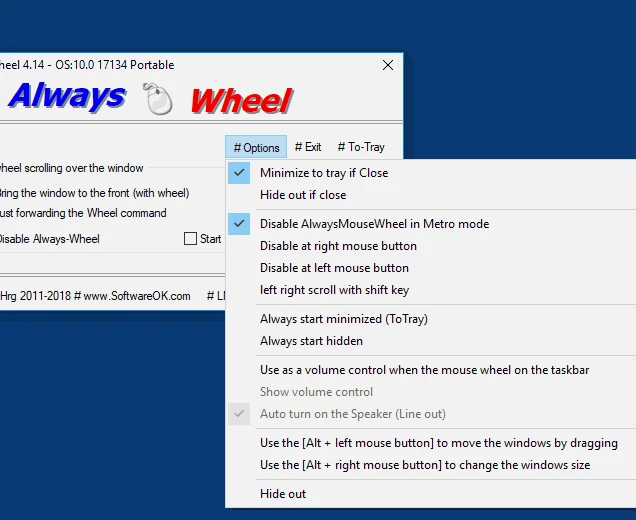
- Scroll background windows: Allows sending scroll commands to windows that are not in the foreground, making control easier without needing to bring the window to the front.
- Option to bring the window to the foreground: If preferred, the program can bring the window you are scrolling in to the front, facilitating interaction.
- Moving windows: With the key combination [Alt + left mouse button], you can move windows by dragging them.
- Changing window size: Using [Alt + right mouse button], it is possible to resize windows.
- Horizontal scrolling: The program also supports horizontal scrolling, which can be useful in many situations.
- Volume control on the taskbar: Allows adjusting the system volume by using the mouse wheel on the taskbar.
Installation and removal:
- No installation required: The software does not require installation and can be launched directly from the desktop.
- Easy removal: If the program does not meet your needs, just close it and delete the file AlwaysMouseWheel.exe.
- Portable version: The portable version of the program is sufficient for most users and can be used on any Windows system, without the need for complex setup.
In summary, Always Mouse Wheel is a practical and useful tool for those who need more agility in using the mouse for navigation between windows in Windows. Being portable, easy to use, and requiring no installation, it is an excellent choice for increasing the productivity of those who work with multiple windows at the same time.
Screenshot