Light Image Resizer 7.5.1.151
Utility that allows you to resize multiple images at once.
Old versions
6.1.9.0
9.64 MB11/08/2023
6.1.6.0
9.68 MB12/15/2022
6.1.3.0
9.68 MB07/14/2022
6.1.2.0
8.56 MB04/27/2022
6.1.1.0
8.56 MB04/01/2022
Description
Light Image Resizer, by ObviousIdea, is software focused on resizing and converting images, available for Windows 11, 10, and 8.1.
Main features
It allows resizing images, converting between various formats, and creating copies or overwriting the originals.
Support for batch processing (multiple images at once) or individual.
Predefined profiles to facilitate common tasks, such as “1K”, “2K”, “Web optimized”, or custom profiles to meet specific needs.
Integrated “collage maker” function, which allows combining several images into a layout with just a few clicks — ideal for social media or blogs.
Support for a wide range of image formats, including JPEG, PNG, animated GIF, TIFF, HEIC, and RAW camera files (CR2, NEF, etc.), as well as options for conversion to PDF or ZIP.
Integration into the Windows context menu: just right-click on the image or folder to start the process.
Additional features such as adding watermarks, batch renaming, compression, live preview, and multi-core support to speed up processing.
New features in version 7
Integration of the “Light Image Editor” for adding text, blur, shapes, and screenshots with OCR.
Support for Windows 11 in the context menu.
Profiles stored as individual files, which can be synchronized via OneDrive.
Support for new formats such as HEIC, WebP with lossless compression, and JPEG XL.
Minimum requirements
Operating system: Windows 11 / 10 / 8.1 (32 or 64 bits)
Processor: 2.0 GHz
RAM: 4 GB
Free disk space: about 500 MB
Recommended for
Light Image Resizer is recommended for those who need:
To batch resize photos for the web, email, or storage.
To convert images between various formats, including RAW files.
To create collages or visual compositions without resorting to complex editors.
To automate tasks such as renaming, applying watermarks, or compressing large volumes of images.
Final notes
Light Image Resizer combines simplicity with advanced features, offering an efficient solution for both personal and professional use in image manipulation and optimization.
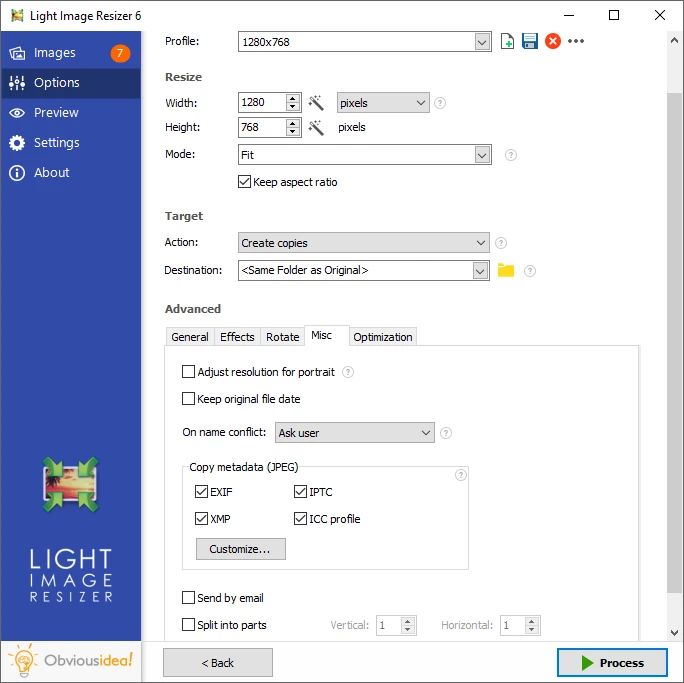
Screenshot