Photo-Brush 5.30
Image editor capable of editing, retouching, filtering with professional quality.
Old versions
See all old versionsDescription
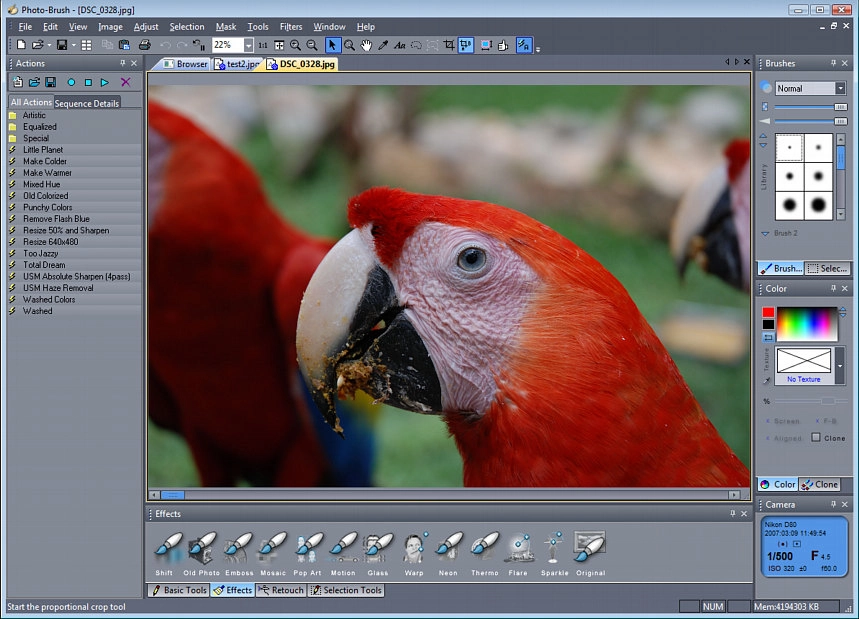
Photo-Brush is an image and painting editor developed by MediaChance, designed for both photo retouching and artistic painting, focusing on performance, versatility, and simplicity.
Main Features of Photo-Brush
Image adjustments: offers classic tools such as levels, RGB curves, hue adjustment, saturation, and brightness/contrast.
Photo retouching: includes specific brushes for retouching, lightening, darkening, coloring, removing red-eye, cleaning skin, and correcting imperfections.
Advanced painting: features more than 30 different types of brushes – natural, artistic, 3D – that support texture, cloning, and spray.
Creative effects: includes effects such as “Liquid Warp” for distortions, “Little Planet” (stereographic projection), and the fractal Droste effect (“image within an image”).
Plugin support: accepts filters compatible with Adobe Photoshop (.8bf) and native extensions (.xtr) to expand the program's capabilities.
RAW Browser: comes with a multithreaded browser to view thumbnails of RAW, JPG, and other files, facilitating the management of multiple images.
Dynamic selection: selection tools allow changing parameters (like the magic wand tolerance) while drawing, with a live preview of the selected areas.
Tablet support: compatible with pressure-sensitive tablets, which improves precision in painting and retouching.
Scanner import: supports TWAIN for scanning from scanners and cameras, including 32-bit film scanners.
Interface and Usability
The interface is lightweight and loads quickly, with minimal resource usage.
Offers a high-contrast UI, ideal for users with visual impairments.
Allows undo/redo of multiple actions, providing flexibility during the editing process.
Compatibility and Requirements
Compatible with Windows (older versions such as XP, Vista, and Windows 7).
Supports common image formats, such as PNG, JPG, BMP, TIFF, PCX, TGA, and PSD (Adobe Photoshop).
Takes up little disk space and uses optimized code for fast startup.
Conclusion
Photo-Brush is an excellent editor for those looking for a lightweight yet powerful tool, with professional retouching features, creative painting, and flexible editing. If you need to retouch photos, combine painting operations, and apply visual effects without using heavy software, Photo-Brush is a very interesting alternative.
Screenshot