MyFolders 10.0.3.79
Windows add-on that adds quick actions to the context menu of Explorer.
Description
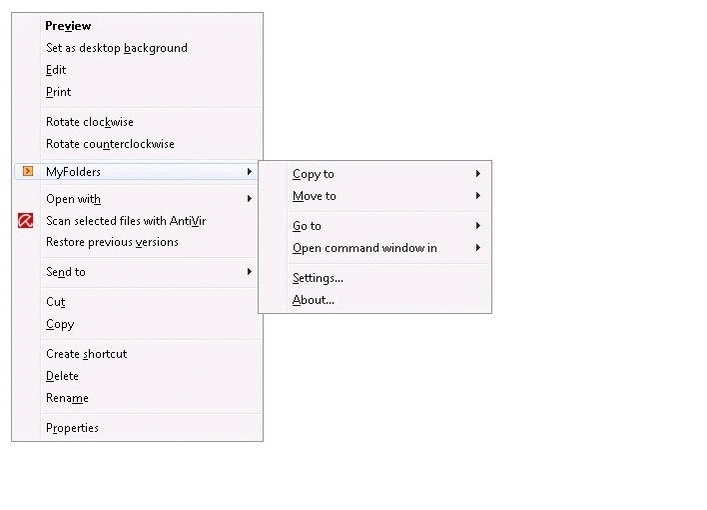
MyFolders is a Windows add-on created by Core Technologies Consulting that adds quick actions to the context menu of Explorer. The proposal is to speed up routine tasks involving frequently accessed folders, reducing the number of steps needed to copy, move, or open specific directories.
The “Copy to” feature allows users to copy files directly to predefined favorite folders. The “Move to” feature instantly moves the selected items to the chosen destination, eliminating manual navigation.
The “Go to” option instantly opens any folder marked as a favorite in Explorer, speeding up access to deep or frequently used directories. There are also commands to open a Command Prompt window at the selected location, both in normal and elevated mode.
MyFolders also offers the function to copy the full path of a folder to the clipboard, facilitating documentation tasks, scripts, and automation. Everything is integrated into the Windows right-click menu, keeping the workflow straightforward and fast.
The software is free and compatible with Windows 7, 8, 10, 11, and equivalent editions of Windows Server, available in both 32-bit and 64-bit versions. The installation is lightweight and focuses on streamlining everyday actions without altering the system's default operation.
Screenshot