Wise Memory Optimizer 4.2.4
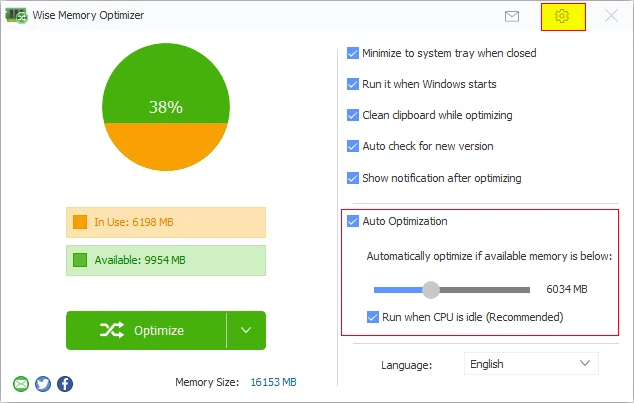
Application that shows in real time the distribution of RAM memory, allowing you to track exactly how much is occupied by processes and how much remains available.
Old versions
4.2.2.128
5.4 MB02/05/2025
4.2.0.123
5.23 MB11/09/2023
4.1.9.122
5.23 MB08/03/2023
4.1.8
5.73 MB10/18/2022
4.1.7
5.58 MB07/26/2022
4.1.6
5.59 MB03/30/2022
Description
Wise Memory Optimizer shows in real time the distribution of RAM memory, allowing you to track exactly how much is occupied by processes and how much remains available. The release occurs through a routine that forces the system to clear memory areas that have been reserved but are no longer actively used by programs.
There is an automatic optimization feature. You can set a RAM usage limit, and when that value is exceeded, the program performs the cleanup without manual intervention. This continuous operation helps reduce sluggishness during times when multiple applications are open or when a program is holding allocated memory unnecessarily.
The software operates without consuming many resources. Once configured, it can remain minimized near the system clock, monitoring memory usage. For users who work with browsers with many tabs, image editors, games, or machines with limited available RAM, optimization tends to show noticeable benefits in overall performance.
There is also the option to start with Windows, keeping the management active from the beginning of the session. Everything works straightforwardly, without the need for advanced technical knowledge.
Screenshot